Let Claude reach sharable.link
When you publish a file, Claude sends it from its code sandbox, and the sandbox only reaches the websites your settings allow. If Claude said it can't reach sharable.link, add it in Claude's settings. It takes about 30 seconds.
On a Team or Enterprise plan, an owner of your organization makes this change. What to send them
1Turn on network access
In Claude, click your name in the bottom-left corner, then Settings → Capabilities. Turn on Code execution and file creation, then Allow network egress just below it.
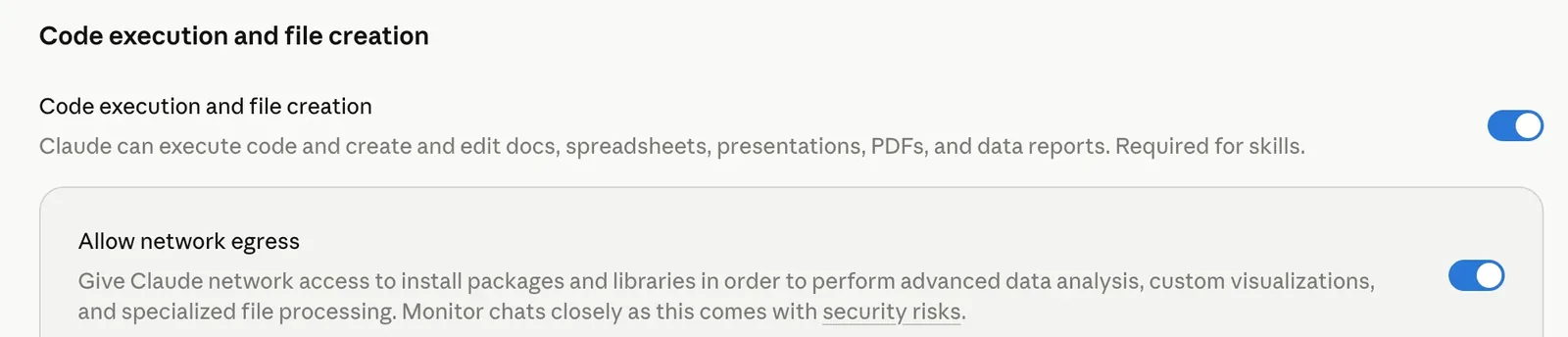 Tap the screenshot to enlarge it.
2Allow sharable.link
Under Domain allowlist, choose All domains. If your list also has Package managers and specific domains, you can choose that instead and add just sharable.link.
 Tap the screenshot to enlarge it.
These screenshots are from April 2026, so the labels may have changed a little since. Using the /share skill instead of the connector and allowing specific domains? Add sharable.vercel.app as well.
Don't skip this
3Start a new chat
The setting only reaches chats you start after you change it. The chat you were in stays blocked, however many times you ask there.
Your file stays in the old chat, so download it from there first. Then open a new chat, attach the file, and say: “Upload report.html to sharable.link”, using your file's name.
On a Team or Enterprise plan?
An owner of your organization changes this, under Organization settings → Capabilities. They turn on Allow network egress, then choose Package managers and specific domains and add sharable.link, or choose All domains. Send them this page.
Rather not change a setting?
Download the file from Claude and upload it yourself at sharable.link/dashboard. Files up to 25 MB, and you get the same link and sharing options.