Why Build Tools with Claude?
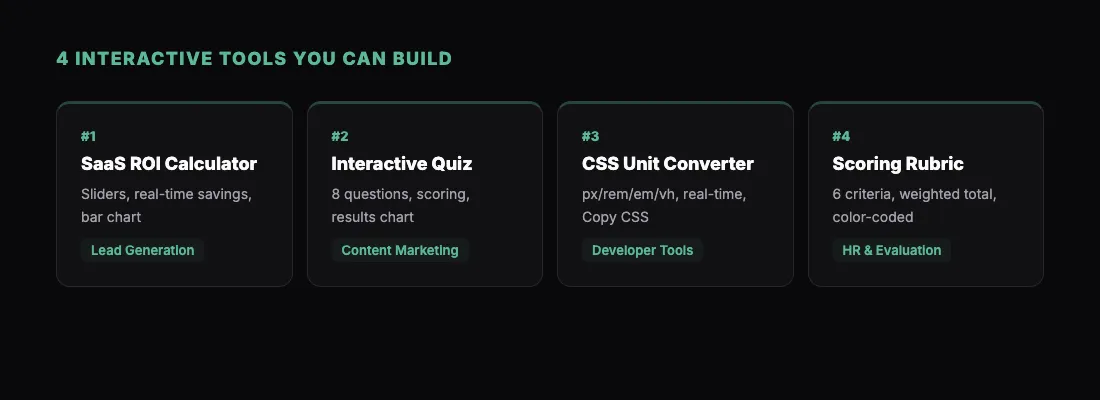
There is a category of small, useful tools that every team needs but nobody has time to build. An ROI calculator for the sales team. A quiz to qualify leads on your website. A unit converter for your engineering docs. A grading rubric that scores automatically.
These tools are simple enough that a developer could build them in a day. But they never make it onto the sprint board because there is always something more important.
Claude changes the economics. You describe the tool in plain English, and Claude builds a fully functional version as a single HTML file — complete with inputs, calculations, styling, and interactivity. The whole process takes minutes, not days.
Then you type /share and the tool is live at a sharable.link URL. Anyone with the link can use it in their browser. No app to download, no account to create, no server to maintain.
Here are four specific tools you can build right now, with the exact prompts to get you started.
Tool 1: SaaS ROI Calculator
ROI calculators are one of the most effective lead generation tools in B2B marketing. They are also tedious to build from scratch. Claude handles the math, the layout, and the interactivity.
"Build an interactive ROI calculator for a project management tool. Include these inputs: number of team members (slider, 5-200), average hourly rate ($50-$200 slider), hours per week spent on manual task management (1-20 slider), and our tool's monthly cost per user ($12 default, editable). Calculate and display: monthly time saved, monthly cost savings, annual cost savings, net ROI after tool cost, and ROI percentage. Show results updating in real time as sliders move. Add a bar chart comparing 'current cost' vs. 'cost with tool.' Use a clean, modern design with a blue accent color. Include a 'Get Started' CTA button below the results."
The real-time updating is key. When a prospect moves the sliders and watches the savings number change, it is far more persuasive than a static PDF.
Once you build this, /share it and add the link to your sales emails, your website, or your demo follow-up sequence.
How to Customize It
After Claude generates the first version, you can tailor it to your product:
"Add a dropdown for company size tier (startup, mid-market, enterprise) that changes the default values for team size and hourly rate."
"Add a section at the bottom that says 'Companies like yours save an average of $X per year' based on the calculated values."
"Include a 'Send me this report' email capture form below the results."
Each iteration is fast, so you can test different versions and share the one that performs best.
Tool 2: Interactive Quiz Builder
Quizzes work for lead qualification, knowledge assessment, onboarding, and content marketing. Claude builds them with scoring logic, branching, and styled results.
"Build an interactive quiz called 'What Project Management Style Fits Your Team?' Include 8 questions, each with 4 multiple-choice options. Categories: Agile, Waterfall, Hybrid, and Kanban. Each answer should weight toward one or more categories. After the last question, show a results screen with the top match, a description of that style, a percentage breakdown across all four categories shown as a horizontal bar chart, and personalized recommendations. Add a progress bar at the top. Use engaging, conversational question copy. Modern card-based design with smooth transitions between questions."
Quizzes built this way are completely self-contained. The scoring logic runs in JavaScript inside the HTML file. No backend needed. Share the link and people can take the quiz immediately.
Making It Your Own
Customize the quiz after the first build:
"Add a lead capture form before showing results — ask for name and email. Style it to match the quiz design."
"Change the results to include a 'Share your result' button that copies a text snippet to clipboard."
"Add a 'Learn More' link under each result that points to a specific page on our site."
Tool 3: Unit Converter with Domain-Specific Logic
General unit converters exist everywhere. But domain-specific ones — the kind that handle the exact conversions your team or audience needs — are harder to find.
"Build a comprehensive CSS unit converter tool. Support conversions between: px, rem, em, vh, vw, pt, and percentage. Include a base font size input (default 16px) and a viewport width/height input for vh/vw calculations. The converter should update all values in real time when any single value changes. Add a reference table below showing common values (e.g., 14px = 0.875rem). Include a 'Copy CSS' button that copies a CSS custom property declaration for the current values. Clean developer-focused design with a monospace font for values and a dark mode toggle."
This kind of tool is perfect for developer documentation, design system guides, or engineering team resources. Build it once, share the link, and your team uses it whenever they need it.
Other Domain-Specific Converter Ideas
The same approach works for other domains:
"Build a recipe unit converter that handles US customary, metric, and Imperial measurements. Include a serving size multiplier."
"Build a photography exposure calculator. Input any two of aperture, shutter speed, and ISO, and calculate the third for proper exposure."
"Build a loan amortization calculator with monthly payment breakdown, total interest, and a payment schedule table."
Each of these takes Claude a few minutes to build and produces a tool that people actually use.
Tool 4: Scoring Rubric and Evaluation Tool
Rubrics are tedious to build as interactive tools, but they are incredibly useful for consistent evaluation — whether you are grading assignments, scoring vendors, or rating job candidates.
"Build an interactive evaluation rubric for scoring job candidates after an interview. Include 6 criteria: Technical Skills, Problem Solving, Communication, Culture Fit, Experience Relevance, and Growth Potential. Each criterion has a 1-5 scale with descriptive labels for each level (e.g., 1 = 'Does not meet requirements', 5 = 'Exceptional'). Click a rating to select it — highlight the selected level. Weight the criteria: Technical Skills 25%, Problem Solving 20%, Communication 20%, Culture Fit 15%, Experience Relevance 10%, Growth Potential 10%. Show a weighted total score at the bottom with a color-coded rating (red/yellow/green). Add a notes textarea for each criterion. Include a 'Print-Friendly Summary' button that reformats the page for printing."
This is the kind of tool that HR teams, hiring managers, and educators constantly need but rarely have in a good interactive format. Share the link before each interview and your panel has a consistent scoring tool.
Variations to Try
"Build a vendor evaluation scorecard with criteria for cost, reliability, support quality, feature completeness, and security compliance."
"Build a content quality rubric scoring articles on accuracy, readability, SEO optimization, originality, and visual design."
Tips for Building Better Tools
Define inputs and outputs clearly. Tell Claude exactly what inputs the user will provide and what the tool should calculate or display. Ambiguity leads to tools that almost work but miss key features.
Specify real-time behavior. If values should update as the user moves a slider or types, say so explicitly. Otherwise Claude may generate a form with a "Calculate" button, which is less engaging.
Test edge cases. After Claude builds the tool, try extreme values. What happens when someone enters 0? Or a very large number? Ask Claude to add input validation:
"Add input validation. Minimum team size is 1, maximum is 1000. Show an error message for out-of-range values."
Ask for mobile responsiveness. Most tools need to work on phones too. Claude handles this well when you ask for it, but it is worth specifying if mobile access matters for your audience.
Brand it. Once the tool works correctly, ask Claude to match your visual brand:
"Update the design to use our brand colors: primary #1E40AF, accent #F59E0B, background #F8FAFC. Add our company name 'Relay' in the header."
Share What You Build
The beauty of building tools with Claude is that they go from idea to live URL in minutes. No deploy pipeline, no hosting setup, no code review.
For more creative examples of what Claude can build, check out Claude Artifacts Examples: 10 Things You Didn't Know Claude Could Build. And if you are looking for more use cases, 5 Things You Can Build with Claude and Share Instantly covers dashboards, reports, and landing pages alongside tools.
Here is how to get started:
- Add the Claude connector — one click, nothing to download
- Copy one of the prompts above into Claude
- Test the tool Claude generates
- Iterate until it works perfectly
- Ask Claude to share it as a link
- Send the link to your team or audience
You will have a working, shareable tool in under ten minutes. Build the next one tomorrow. Before long, you will have a library of useful tools that your team actually uses — all built with a prompt and shared with a link.