Skip the comparison? Drop your HTML on /free-html-hosting and get a public link in 5 seconds.
You Don't Need a Server
There was a time when putting a web page online required renting a server, configuring Apache or Nginx, and uploading files via FTP. That era is over.
In 2026, there are multiple free platforms that host static HTML files with zero server management. The question isn't whether you can host an HTML file for free — it's which tool fits your situation best.
This guide compares five options in detail: GitHub Pages, Netlify Drop, Vercel, Tiiny.host, and sharable.link. Each serves a different use case, and the best choice depends on where your HTML came from and who needs to see it.
1. GitHub Pages
GitHub Pages serves static sites directly from a GitHub repository. It's deeply integrated with Git and supports custom domains.
Setup process:
- Create a free GitHub account at github.com.
- Create a new repository (public for free hosting).
- Upload your HTML file as
index.html. - Navigate to Settings > Pages.
- Select the branch (usually
main) and save. - Your site goes live at
username.github.io/repository-name.
Pros:
- Completely free with no bandwidth limits for reasonable usage.
- Version control built in — every change is tracked.
- Supports custom domains with free HTTPS.
- Widely used and well-documented.
Cons:
- Requires a GitHub account and basic Git knowledge.
- Repository must be public on the free tier (private repos require GitHub Pro).
- Build times of 1-2 minutes after each push.
- No built-in password protection.
- Overkill for sharing a single file quickly.
Best for: Developers hosting project documentation, portfolio sites, or open-source project pages that need long-term hosting with version control.
2. Netlify Drop
Netlify Drop is Netlify's drag-and-drop deployment tool. No CLI, no Git integration — just a file drop.
Setup process:
- Go to app.netlify.com/drop.
- Drag your HTML file (or folder) onto the drop zone.
- Wait a few seconds for deployment.
- Get a URL like
random-name-123456.netlify.app.
Pros:
- No account needed for temporary deploys.
- Drag-and-drop from your browser — nothing to install.
- Global CDN delivery for fast loading worldwide.
- Free custom domains with an account.
Cons:
- Temporary deploys without an account expire after a short period.
- Free tier allows 100 GB bandwidth per month (sufficient for most use cases).
- No password protection on the free plan.
- Random subdomain names are not memorable or professional.
- Need a Netlify account to manage or update after initial deploy.
Best for: Quick one-off deploys of files you built yourself when you need a URL fast and don't mind creating an account for permanence.
3. Vercel
Vercel is a frontend deployment platform built for frameworks like Next.js, but it works with plain HTML too.
Setup process:
- Install Node.js (if not already installed).
- Install the Vercel CLI:
npm install -g vercel. - Navigate to the directory with your HTML file.
- Run
verceland follow the prompts. - Get a URL like
your-project.vercel.app.
Alternatively, connect a GitHub repository and Vercel deploys automatically on push.
Pros:
- Edge network provides excellent global performance.
- Automatic HTTPS on all deploys.
- Preview deployments for every Git branch.
- Generous free tier: 100 GB bandwidth, unlimited deploys.
Cons:
- Requires Node.js and the CLI for the simplest workflow.
- Designed for framework-based apps — plain HTML feels like an afterthought.
- Free tier limited to personal/hobby use (commercial use requires a paid plan).
- No built-in password protection on the free tier.
Best for: Developers who already use Vercel for their projects and want to add a quick static page to their existing workflow.
4. Tiiny.host
Tiiny.host is purpose-built for hosting single HTML pages. The entire product focuses on the simplest possible path from file to URL.
Setup process:
- Go to tiiny.host.
- Click "Upload" and select your HTML file.
- Choose a subdomain name.
- Get a URL like
your-name.tiiny.site.
Pros:
- Simplest upload experience of any option.
- No technical knowledge required — it's a web form.
- Custom subdomain names.
- HTTPS included.
Cons:
- Free tier limited to 1 site.
- Free sites expire after 7 days.
- Permanent hosting requires a paid plan ($6/month or $36/year).
- Limited file size on the free tier.
- No password protection without paying.
Best for: Non-technical users who need to share one HTML page temporarily and don't mind the 7-day expiration.
5. sharable.link
sharable.link is built specifically for sharing HTML content created by Claude. Instead of a separate hosting platform, it operates as a command inside your Claude conversation.
Setup process:
- Add the Claude connector — one click from the Claude Directory, nothing to download.
- Ask Claude to create something (a dashboard, report, tool, or page).
- Ask Claude to share it as a link.
- Get a URL like
sharable.link/a1b2c3d4.
Pros:
- Fastest path from creation to URL — no context switch.
- No separate account or login needed.
- Built-in password protection at no cost.
- Content renders in a sandboxed iframe for security.
- Works for any HTML that Claude generates.
Cons:
- Designed for AI-generated content — not a general-purpose host.
- Requires Claude Code or Cowork to use the
/sharecommand. - URLs are hash-based, not customizable subdomains.
Best for: Anyone using Claude who needs to share AI-generated HTML — dashboards, reports, tools, landing pages, prototypes.
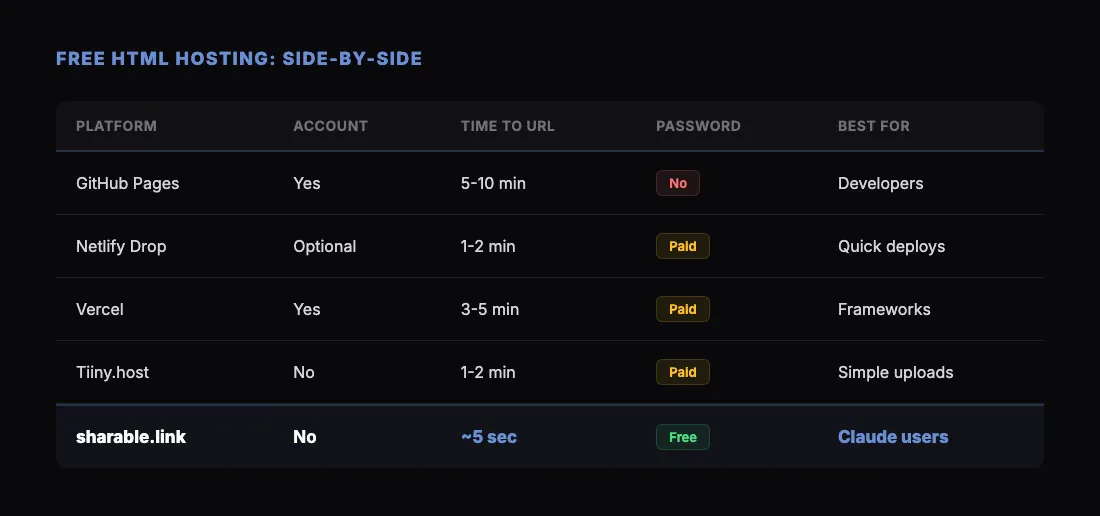
Side-by-Side Comparison
How to Decide
Pick GitHub Pages if you want permanent hosting with version control and you're comfortable with Git. This is the developer's default.
Pick Netlify Drop if you need to share a file quickly and you built it yourself. The drag-and-drop interface can't be beat for browser-based one-off deploys.
Pick Vercel if you're already in the Vercel ecosystem and want your static page to live alongside your other projects. The CLI workflow is smooth once you have it set up.
Pick Tiiny.host if you're non-technical and need the simplest possible upload. Just know that free links expire.
Pick sharable.link if Claude built the HTML. The integration is built in — sharing is one command inside the same conversation where you created the content. There's no simpler way to go from AI-generated HTML to a public URL.
The Bigger Picture: AI Changes the Equation
These five tools have been around in some form for years (except sharable.link). But the rise of AI-generated HTML changes which one matters most.
Before 2024, hosting decisions were about long-lived websites that got updated over time. You wanted version control, CI/CD, custom domains, and team permissions. GitHub Pages and Vercel were natural fits.
Now, a growing share of HTML files are generated by AI assistants — one-off artifacts that need to be shared immediately. The file was created in seconds. The sharing tool should match that speed.
That's the gap sharable.link fills. Not replacing traditional hosting, but serving the new workflow where HTML is generated on demand and shared instantly.
New to the format itself? Start with what an HTML file is and why Claude builds artifacts as HTML. For a broader look at how to host HTML files, see our guide to hosting HTML files online for free. If you're specifically sharing Claude's output, check out how to share a Claude dashboard for a step-by-step walkthrough.
Get Started
If you're using Claude and want the fastest way to share what you build:
- Add the Claude connector — one click from the Claude Directory, nothing to download.
- Sign in with Google or Microsoft when Claude asks, then approve the permissions.
- Ask Claude to create something.
- Ask Claude to share it as a link, and send that link.
No servers. No accounts. No deploy pipelines. Just a link.