The Agency Delivery Problem
Agencies bill for outcomes, but a surprising amount of time goes to delivery mechanics. Building the deck. Formatting the report. Setting up a staging environment so the client can preview a landing page. Getting the dashboard into a state where it is presentable.
None of this is the work the client is paying for. It is overhead that eats into margins and slows down delivery timelines.
Claude, combined with sharable.link, collapses the delivery step. You go from "the work is done" to "here is your link" in minutes instead of hours. No staging servers. No PDF exports that break layouts. No "let me screen-share and walk you through it."
Here are four ways agencies are using this today.
Use Case 1: Research Briefs
Research briefs are the bread and butter of strategy agencies. A client asks for a competitive landscape analysis, a market sizing exercise, or a technology audit. The deliverable is usually a slide deck or a Google Doc, and it takes a disproportionate amount of time to format properly.
With Claude, the workflow looks like this:
- Gather your research findings, data points, and analysis
- Paste everything into Claude with instructions for the deliverable
"Create a competitive landscape brief for [client industry]. Use this data: [paste research]. Include an executive summary, a competitor comparison matrix, individual competitor profiles with strengths and weaknesses, and strategic recommendations. Design it as a polished HTML document with a professional color scheme."
- Review and iterate until the brief matches your agency's quality bar
- Run
/shareto publish it - Send the link to the client
The client gets a polished, interactive document they can read on any device. No slide deck to download. No formatting issues across different versions of PowerPoint.
For research briefs that include confidential competitive intelligence, add password protection. The client gets a clean password prompt before seeing any content.
Use Case 2: Data Dashboards
Clients want to see their numbers. Agencies that run paid media, SEO, or content programs spend hours every month building dashboard views in Google Slides or Looker Studio.
Claude builds better dashboards faster:
"Create a monthly performance dashboard for a paid media account. Here are the metrics: [paste data]. Include a KPI summary row at the top (spend, impressions, clicks, conversions, CPA, ROAS), a line chart showing daily spend and conversions for the month, a campaign breakdown table, and a recommendations section. Use the client's brand colors: [hex codes]."
The result is a standalone HTML page with charts, tables, and clean formatting. When the client clicks the sharable.link URL, they see an interactive dashboard that looks better than most reporting tools.
What makes this powerful for agencies is iteration speed. When the client says "Can you add a channel breakdown?" or "What about comparing to last month?", you make the change in Claude and re-share. No rebuilding slide layouts. No re-exporting.
If you want a deeper walkthrough of the dashboard workflow, see how to share a Claude-built dashboard.
Use Case 3: Client Proposals
Proposals win or lose work. They need to look professional, include accurate scope and pricing, and be easy to share with decision-makers who were not in the room during the pitch.
Claude handles every section:
"Create a project proposal for [project type]. Client: [client name]. Include these sections: executive summary, project understanding, proposed approach, timeline with milestones, team composition, pricing (three tiers: basic at $X, standard at $Y, premium at $Z), terms and conditions, and next steps. Make it visually polished with the proposal feeling like it came from a serious agency."
The output is a complete proposal page. Tables are formatted. The pricing section is clear. The timeline has visual milestones. And because it is HTML, it looks perfect on any screen size.
Password-protect the proposal before sharing. You do not want a prospect forwarding your pricing to a competitor:
"/share with password [proposal-password]"
Send the link and the password separately. The client shares the link internally, and everyone who needs to review it can access it with the same password.
For a step-by-step guide on building proposals this way, read how to build a client proposal with Claude.
Use Case 4: Landing Page Reviews
Web agencies and design studios build landing pages constantly. The review cycle is painful: deploy to staging, send the URL, wait for feedback, parse vague comments, redeploy, repeat.
Claude enables a faster feedback loop:
"Create a landing page mockup for [product/service]. Headline: [headline]. Subheadline: [subheadline]. Include a hero section with a CTA button, three feature blocks with icons, a testimonial section, a pricing table, and a footer. Use this color palette: [colors]. Make it responsive."
Share the mockup via sharable.link. The client sees a real page in their browser, not a Figma file or a static screenshot. They can scroll, click, and experience it like a real visitor would.
Collect feedback, make changes in Claude, and re-share. You can go through three rounds of revision in the time it used to take to deploy one staging build.
This is especially useful for early-stage concepts. Before committing engineering time to build anything, share a Claude-generated mockup and validate the direction with the client.
The Margin Impact
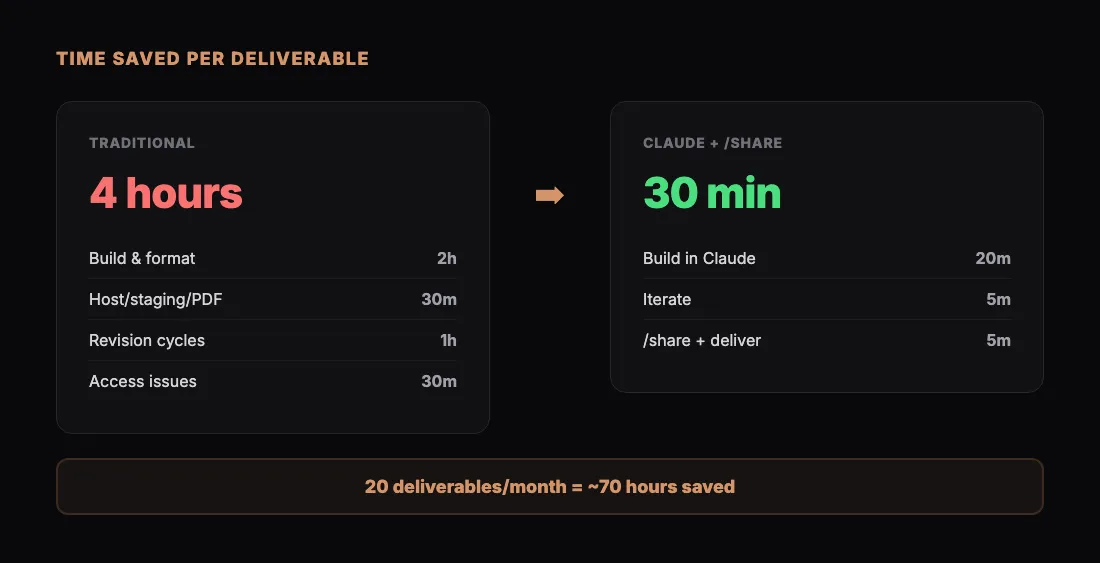
The math is straightforward. Take a typical client deliverable that requires:
- 2 hours to build and format the content
- 30 minutes to set up hosting, staging, or PDF export
- 1 hour of revision cycles due to formatting issues or version confusion
- 30 minutes of back-and-forth about access and viewing problems
That is 4 hours of delivery overhead per deliverable. With Claude and sharable.link, the same deliverable takes about 30 minutes. The content is built faster, there is no hosting step, revisions are instant, and the client clicks a link that works everywhere.
For an agency delivering 20 client documents a month, that is roughly 70 hours saved. At blended agency rates, that is real money back in the margin or capacity freed up for billable work.
How to Start
You do not need to transform your entire agency workflow at once. Start with one deliverable type:
- Pick your most repetitive deliverable. Monthly reports are a good candidate. So are research briefs.
- Build it once with Claude. Spend the time getting the prompt right and the output polished.
- Share it via sharable.link. See how the client reacts to the format and the link-based delivery.
- Save your prompt. Next month, update the data and re-run. The second time takes half as long.
If you want the full end-to-end workflow from prompt to published deliverable, read the complete Claude sharing workflow.
What Clients Actually Say
Clients do not care how you built the deliverable. They care that it looks good, it is easy to access, and it arrives on time.
Link-based delivery solves all three. The output is well-designed because Claude handles formatting. It is easy to access because it is a URL that works in any browser. And it arrives faster because you cut hours of delivery overhead.
The agencies that figure this out first get a real advantage: faster delivery, better margins, and happier clients. That combination tends to compound.
Try It With Your Next Deliverable
Open Claude with real client data. Build the deliverable. Share it. Send the link. See how much time you save versus your current process.
Most agencies that try this once make it a standard part of their workflow within a week.