The Problem
You installed a Claude skill, asked Claude to use it, and got an error like this:
The sandbox can't reach sharable.vercel.app — it's blocked by the network allowlist in this environment.
Or maybe Claude just told you the request failed without a clear reason. Either way, the skill can't connect to the external service it needs.
This is one of the most common issues people hit when using Claude skills for the first time — and the fix takes about 30 seconds.
Why This Happens
When Claude runs code — including the code inside skills — it operates inside a sandbox. This is an isolated environment with restricted internet access. By default, the sandbox can only reach package manager domains like npm and PyPI.
Skills that call external APIs (like the /share skill for publishing to sharable.link, or any skill that needs to POST data to a server) will fail because their requests get blocked by this restriction.
The setting that controls this is called the Domain allowlist, and it has three levels:
- None — No internet access at all. Maximum isolation.
- Package managers only — Can reach npm, PyPI, GitHub registries. This is the default for Team plans.
- All domains — Full outbound internet access. This is the default for Pro and Max plans.
If you're on a Team plan, or if someone changed your settings, you might be on "Package managers only" — which blocks skills from reaching external services.
Video Walkthrough
Watch the fix in action:
How to Fix It
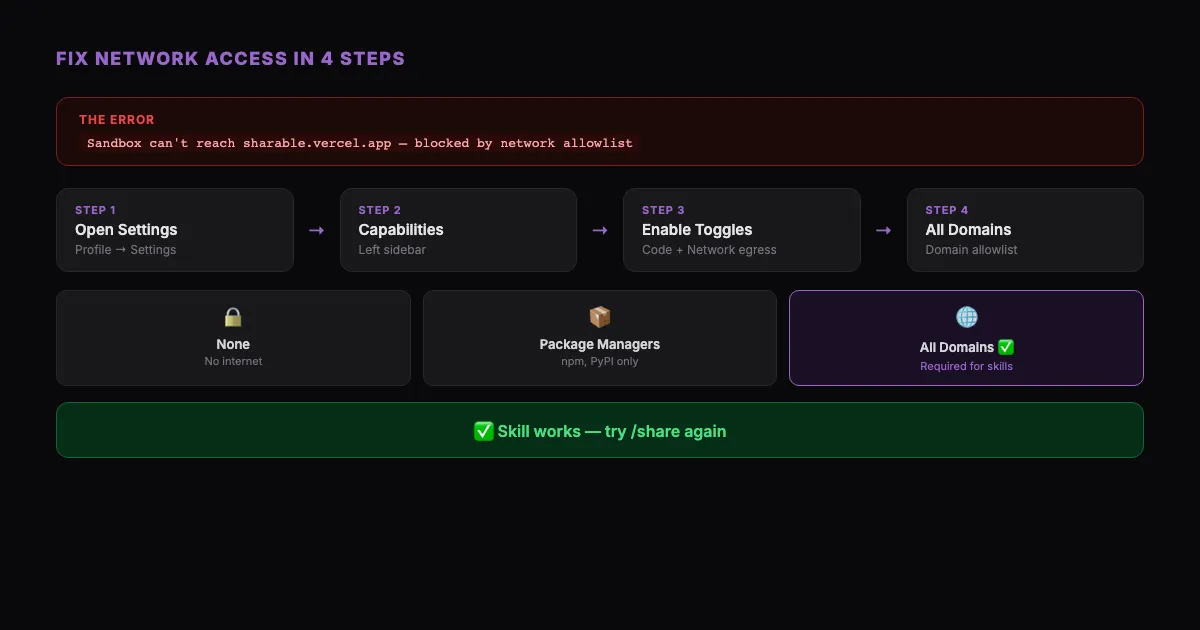
Step 1: Open Settings
Click your profile icon in the bottom-left corner of Claude, then click Settings.
Step 2: Go to Capabilities
In the left sidebar, click Capabilities. Scroll down to the Code execution and file creation section.
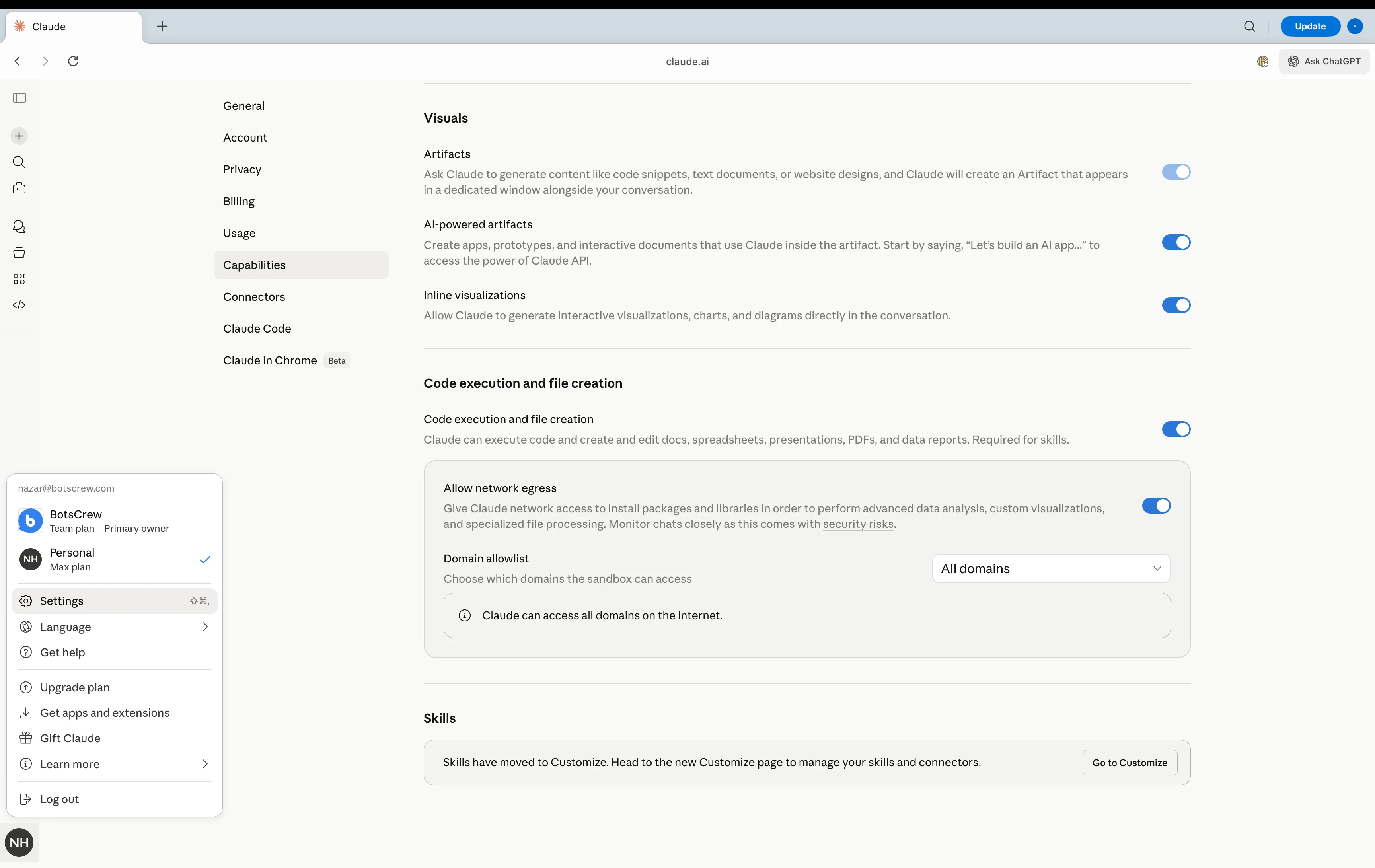
Step 3: Enable Both Toggles
Make sure both toggles are turned on (blue):
- Code execution and file creation — must be enabled
- Allow network egress — must be enabled
If either toggle is off, the skill won't be able to run code or make network requests at all.
Step 4: Change Domain Allowlist to "All Domains"
Click the Domain allowlist dropdown and select All domains.
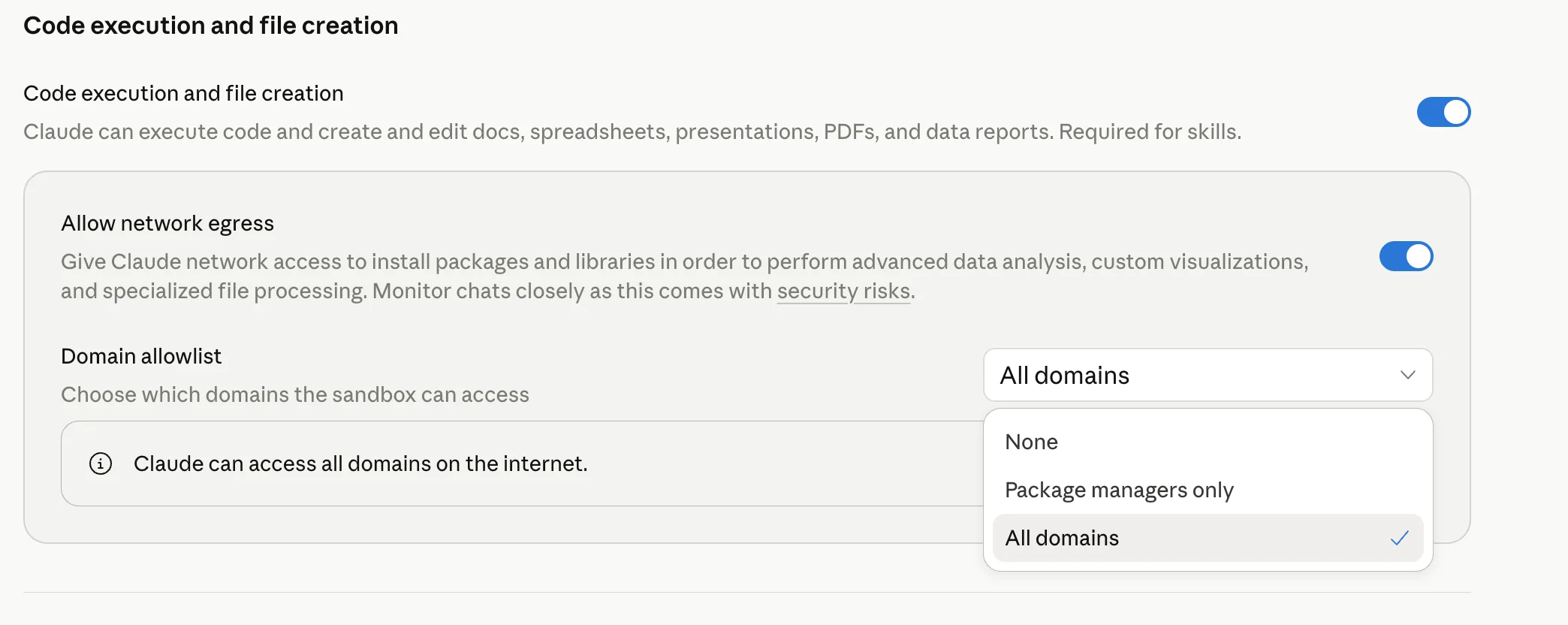
You should see the confirmation message: "Claude can access all domains on the internet."
Step 5: Start a New Chat
Important: settings changes don't apply to the current conversation. Start a new chat, then ask Claude to run the skill again. It should work now.
Is This Safe?
Changing to "All domains" is the default setting for individual Pro and Max plans. Here's what to know:
Claude still runs in a sandbox. It can't access your local files, browser, or other apps. "All domains" just means the sandbox can make outbound HTTP requests to websites — which is exactly what skills need to function.
You can see everything Claude does. Every request, every piece of code — it all appears in your conversation. You can stop Claude at any time if something looks wrong.
Team and Enterprise plans have this setting controlled by organization admins. If you're on a managed plan, ask your admin to either:
- Change the Domain allowlist to "All domains" at Organization settings > Capabilities
- Or add the specific domain (like
sharable.vercel.app) to the allowlist if they prefer a more restrictive approach
Common Skills That Need Network Access
This isn't just a sharable.link issue. Any skill that calls an external API will need "All domains" enabled. Common examples:
- /share — publishes HTML to sharable.link
- Translation skills — that call translation APIs
- Data enrichment skills — that look up information from external sources
- Notification skills — that send messages to Slack, email, or other services
If you install a new skill and it fails on the first try, check the Domain allowlist before debugging anything else. Nine times out of ten, that's the fix.
Still Not Working?
If you've changed the setting and the skill still fails:
- Check that both toggles are on — "Code execution" AND "Allow network egress"
- Try a new conversation — some settings changes may not apply to existing conversations
- Check the error message — if it mentions a specific domain, your admin may need to add it to the allowlist
- Reach out to the skill creator — the API endpoint may be down or the skill may need an update
For sharable.link specifically, the skill needs access to sharable.vercel.app. If you're on a restricted plan where only specific domains can be allowed, add that domain to your allowlist.