Just want to add one? Claude's directory lists them under Settings → Connectors. The sharable.link connector is one click from there.
What Is a Claude Connector?
A connector is a service Claude is allowed to call on your behalf.
That is the whole idea. Claude on its own can read your conversation and write text. A connector extends that: once you have added one, Claude can search your email, read a Notion page, open a design file, or publish a web page — because you granted it access to a specific outside service, and to nothing else.
Underneath, every connector is a remote MCP server. MCP — the Model Context Protocol — is an open standard for describing tools an AI model can call. A server implementing it advertises a list of tools, each with a name, a description, and a schema for its inputs. Claude reads that list, decides when a tool is relevant, and calls it.
Two words get used loosely here, so it is worth separating them:
- MCP server is the technical thing: a program that speaks the protocol.
- Connector is the product thing: a hosted MCP server you can add from Claude's own interface, sign in to, and use without touching a config file or a terminal.
Every connector is an MCP server. Not every MCP server is a connector — a script running on your laptop speaks the same protocol but nobody else can reach it. That distinction turns out to matter, and we will come back to it.
Connectors, Skills, and Plugins Are Not the Same Thing
Claude has three ways to be extended, and they are constantly mistaken for each other. The shortest way to keep them apart:
- A skill teaches Claude how to do something. It is instructions — a document Claude reads when the task matches. Skills do not reach the network by themselves. Our own guide to installing Claude skills walks through the mechanics.
- A connector gives Claude access to something. It is a live connection to an outside service, with authentication and real permissions attached.
- A plugin bundles the above. One installable unit that can carry skills, connectors, commands, and sub-agents together, which is why Cowork plugins tend to arrive as a package for a whole job function rather than a single capability.
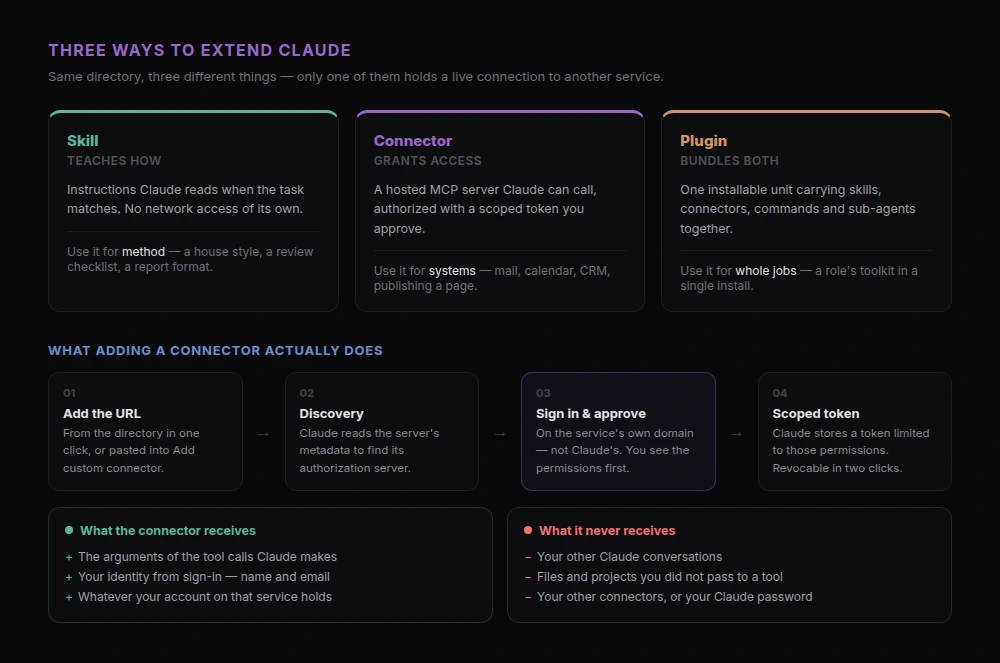
The practical test: if what you need is knowledge or method — a house style, a review checklist, a way of formatting a report — you want a skill. If you need Claude to touch a system that lives somewhere else — your calendar, your CRM, a hosting service — you want a connector. Anthropic now lists all three in one directory, which is convenient but blurs exactly this line, so it is worth knowing which kind of thing you are installing.
Where Connectors Live in Claude
Connectors are account-level, not conversation-level. You add one once and it is available across your Claude surfaces — web, the macOS and Windows desktop apps, mobile, Cowork, and Claude Code.
On the web, they live under Settings → Connectors (the panel sits at claude.ai/customize/connectors). You will see two things there: the connectors already attached to your account, and a way into the directory to browse more.
The directory is Anthropic's catalogue of listings you can add in a click. It has grown from a few dozen in early 2026 to several hundred, and the number moves week to week, so treat any published count — including this one — as a snapshot rather than a fact. Listings carry a verification status: some are verified by Anthropic, and the rest are community listings, which are exactly what they sound like — real, usable, and not vetted by Anthropic. Our own connector is a community listing, and Claude says so on the consent screen before you add it.
What Happens When You Add One
This is the part worth understanding, because it is where people's mental model is usually wrong.
Adding a connector runs an OAuth handshake. Concretely:
- You click Add on a listing, or paste a URL into the custom connector dialog.
- Claude fetches the server's metadata to discover where its authorization server lives.
- A sign-in window opens — on the service's own domain, not Claude's. You are signing in to that service.
- The service shows you the permissions being requested. You approve or decline.
- The service hands Claude a scoped access token. Claude stores it and refreshes it as needed.
The important detail: you are not giving Claude your password, and you are not giving the service your Claude account. You are authorizing one specific token, scoped to one specific set of permissions, which either side can revoke later.
Our connector asks for two scopes, pages:read and pages:write, because it needs to list the pages you own and create new ones. That is the entire permission surface. A connector that wanted more would have to ask for more, on that same screen, where you would see it.
What a Connector Can and Cannot See
The most common worry we hear is that adding a connector lets a third party read your Claude history. It does not, and the reason is structural rather than a promise.
A connector is a server sitting behind a set of tools. It receives a tool call — a function name and its arguments — and returns a result. It has no channel to your conversation and no way to ask for one. If Claude never calls a tool, the connector receives nothing at all.
So what does it actually see? Whatever gets passed into those tool calls, plus whatever your account with that service already contains. For ours, that means: your email address and name from sign-in, the HTML you asked Claude to publish, the pages under your account, and their view counts. It cannot see your other chats, your uploaded files, or your other connectors.
Two consequences follow, and they cut in both directions:
- The blast radius is bounded. A misbehaving connector can misuse its own tools and its own service. It cannot roam around your Claude account.
- The content of the call is not bounded. If a tool takes a document as an argument and Claude sends your quarterly numbers to it, that data has left. Read what the tools do before approving write access — the tool list is right there on the consent screen.
Custom Connectors: Adding One by URL
If a service is not in the directory, you can add it yourself. In Settings → Connectors, choose Add custom connector, then give it a name and the server's URL. There is an advanced section for an OAuth client ID and secret, which most hosted connectors do not need.
Three things trip people up here:
The URL has to be exact. MCP's OAuth flow compares the URL you typed against the identifier the server publishes, using plain string comparison. A trailing slash, a stray www., or http instead of https fails with an unhelpful error. Copy it from the source; do not retype it from memory. (This is not a hypothetical — it is the single most common support message we get, which is why our own connector page prints the URL with a copy button rather than as prose.)
Claude connects from Anthropic's cloud, not from your computer. The server has to be reachable on the public internet. A local MCP server on localhost:3000 cannot be a connector, no matter how correct the URL is — local servers are what Claude Code's own MCP configuration is for, and the two mechanisms are not interchangeable. This is the practical meaning of the distinction from earlier: every connector is an MCP server, but a server only becomes a connector once it is hosted somewhere Claude's servers can reach.
Plan and org rules apply. Custom connectors are available across plans, including free — but the free plan is limited to one at a time. On Team and Enterprise, an owner adds a connector for the organization first, and members then connect to it individually; a member who tries to add one directly will find the option unavailable. If you are on a work account and the dialog is not there, that is why, and the fix is a request to your workspace owner rather than a different URL. Check Anthropic's connector documentation for the current specifics — this is the area most likely to have changed since publication.
Which Connectors Are Worth Adding
There is no universal top ten, and any list of one is mostly a reflection of the writer's job. The directory is the live inventory; browse it against your own week. What is worth copying is the reasoning.
Sort candidates by how much manual copying they remove:
- Where your work already lives. Mail, calendar, and drive connectors — Gmail, Google Calendar, Google Drive, Slack, Notion — pay for themselves immediately, because the alternative is pasting context into every conversation by hand.
- Where your team's state lives. Project trackers and CRMs like Asana or HubSpot let Claude answer questions about what is actually happening rather than what you remember happening.
- Where the work comes out. This is the category people forget. Claude can produce a dashboard, a proposal, or a report in one turn, and then it sits inside a chat window. A publishing connector closes that loop: our own takes the HTML Claude just wrote and puts it at a URL you can send to somebody, then updates it in place when the numbers change.
One honest caveat about this category, from our own data: roughly half the accounts that authorize our connector never publish anything with it, while their client dutifully refreshes tokens for weeks. The pattern is stark — the first use happens within about 48 hours or it never happens. Adding a connector is not the same as adopting it. Add fewer, and use one on something real the same day, or you are just accumulating grants.
How to Vet a Connector Before You Approve It
The consent screen is the last cheap moment to think. Five questions, in order of how much they matter:
- Who published it, and is the listing verified? A community listing is not disqualifying — it means Anthropic has not vetted it, so you are the reviewer. Check whether the publisher is who you think it is.
- Which tools does it register, and do any of them write? Read-only tools are a much smaller decision than tools that create, modify, or delete.
- What data would flow through those tools? Not what the connector could reach in theory — what the arguments actually contain.
- Where does the sign-in page live? It should be on the service's own domain. A sign-in that asks for credentials for some other service is the shape of a phishing attempt.
- Can you remove it cleanly? Removing a connector in Claude revokes access. Whether it also deletes data is a question for the service, and a good one to answer before you start rather than after.
If a connector fails any of the first four, do not add it. That is the whole review.
When a Connector Will Not Connect
Four failures cover almost everything we see:
- "Couldn't reach the MCP server." Nearly always the URL — a trailing slash, a query string, or the wrong path. Re-copy it from the source.
- The sign-in window never appears. Your browser blocked the popup. Allow popups for
claude.aiand add the connector again. - Claude keeps asking you to sign in. The stored token expired and the refresh failed, usually after a long gap. Remove the connector and add it again.
- The option to add is missing entirely. You are on a Team or Enterprise account where an owner has to add it first, or you are on the free plan and already have one custom connector attached.
Nothing on that list requires a developer, which is a reasonable sanity check: connector problems are configuration problems, and if a fix asks you to run something in a terminal, you have probably wandered into local MCP territory instead.
Common Questions About Claude Connectors
What do connectors do in Claude?
They let Claude use an outside service during a conversation — reading from it, and where you have granted write access, acting in it. Without a connector, Claude works only from what is in the chat.
Can Claude use connectors in the chat interface?
Yes. Connectors are attached to your account and available in ordinary Claude conversations on web, desktop, and mobile, as well as in Cowork and Claude Code. You do not need a developer environment.
What are the best connectors for Claude?
The ones matching the tools you already open every day — mail, calendar, docs, your tracker — plus one that gets work back out of Claude and in front of other people. Browse the directory rather than a listicle: it is the only inventory that is current, and it shows verification status per listing.
Are Claude connectors free?
Adding them is part of your Claude plan, including the free tier, though the free plan allows one custom connector at a time. The connected service sets its own pricing — a connector to a paid product still needs an account there. Ours is free.
Do connectors work in Claude Code?
Yes, and Claude Code can also run local MCP servers that are not connectors at all. If you are wondering which surface you should be in for a given job, Cowork vs Claude Code breaks down the difference.
How do I remove a connector?
Settings → Connectors, then remove it. That revokes Claude's access. Anything the connector already created in the other service stays there — for a publishing connector like ours, published pages remain live until you delete them.
Is a connector the same as a plugin?
No. A plugin is a bundle that may contain connectors, skills, and commands together. A connector is one authenticated link to one service. Installing a plugin can therefore add a connector, but not the other way around.
Get Started
Connectors are the layer where Claude stops being a very good writer and starts being able to act. The mental model that keeps you safe is small: a connector is a hosted MCP server, you authorize it with a scoped token on the service's own domain, it sees only what its tools receive, and you can revoke it in two clicks.
The category most people are missing is the last one — somewhere for the work to go:
- Add the sharable.link connector — one click from the Claude directory, nothing to download.
- Sign in with Google or Microsoft when Claude asks, then approve the two permissions.
- Ask Claude to build something worth showing someone.
- Ask Claude to share it as a link, and send that link to a person the same day.
Next, see what that unlocks: what Claude artifacts are and how to share them, or the complete prompt-to-published workflow.