Already have an HTML file and just need a link? Drop it on /free-html-hosting — public URL in seconds, optional password, free account.
What Is an HTML File?
An HTML file is a plain text file that a web browser knows how to draw.
That is the whole idea. Open one in a text editor and you see ordinary text with tags around it. Open the same file in Chrome or Safari and you see a page — headings, colors, buttons, charts. Nothing was compiled. Nothing was installed. The browser read the text and rendered it.
The name comes from HyperText Markup Language. The markup part describes structure: this is a heading, this is a list, this is a table cell. The hypertext part means any piece of it can link to anything else on the web. Files use the .html extension, or occasionally .htm — a leftover from when DOS limited extensions to three characters.
Two properties make HTML files unusual compared to almost every other file on your computer:
- They are human-readable. A
.docxor a.pdfis a binary container you need software to decode. An.htmlfile is text you can read, edit, search, and diff. - Every device already opens them. Every phone, laptop, and tablet ships with a browser. There is no "you need the right app to view this" problem, no version mismatch, no license.
Hold on to both of those. They are the reason Claude writes its artifacts as HTML instead of anything else.
What Is Actually Inside One
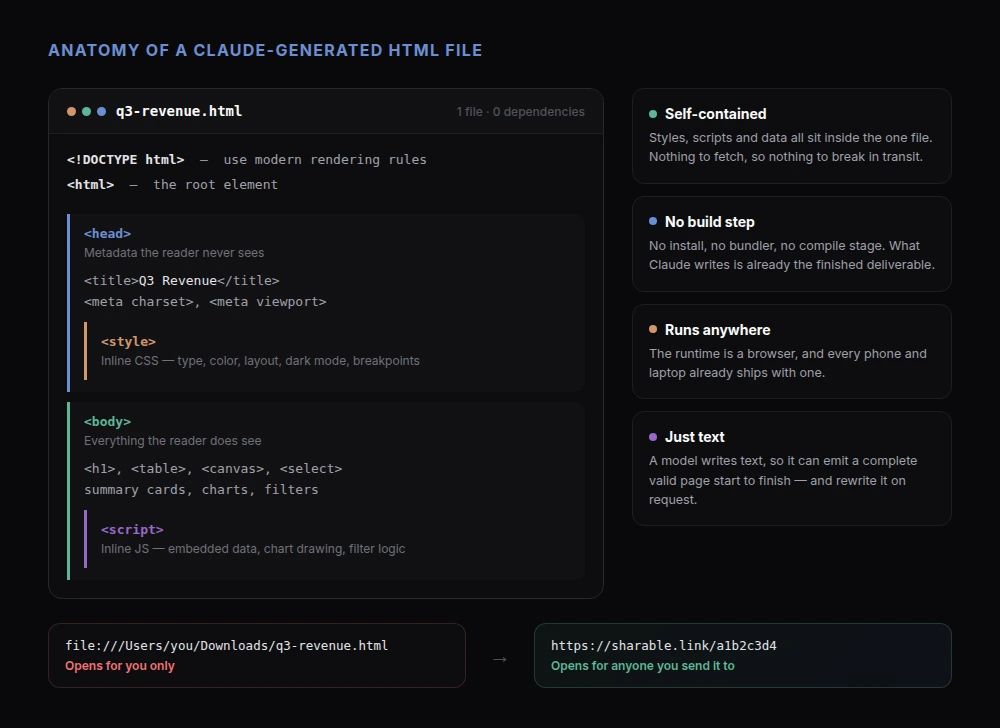
A working HTML file has four nested parts:
<!DOCTYPE html>— a single line telling the browser to use modern rendering rules.<html>— the root element that wraps everything else.<head>— metadata the reader never sees directly: the page title, the character encoding, the viewport settings, and usually the styles.<body>— everything the reader does see.
Then there are the two elements that turn a static document into something that looks and behaves like an application:
<style>holds CSS: fonts, colors, spacing, layout, dark mode, responsive breakpoints.<script>holds JavaScript: anything that reacts. A filter dropdown, a chart that animates as it loads, a calculator that recomputes while you type.
Both of those can either point at external files or sit inline in the same document. That choice sounds like a technical detail. It is actually the hinge of this entire article.
A file with its styles and scripts inline is self-contained: one file, zero dependencies, complete. A file that links out to styles.css, app.js, and three CDN bundles is a project — and a project needs a folder, a web server, and usually a build step before anybody else can look at it.
Claude writes the first kind. Deliberately.
HTML vs PDF vs Screenshot
People reach for three formats when they need to hand someone a finished thing. They are not interchangeable.
A screenshot is a picture of a result. It is the fastest to produce and the least useful to receive. Nothing is clickable, nothing scrolls, nothing can be copied out, and text inside it cannot be searched or read by a screen reader.
A PDF is a frozen page. It was designed for print, which means it is excellent at guaranteeing that page 4 looks identical everywhere and poor at everything else. It cannot recalculate, filter, or respond to a click. On a phone, a PDF laid out for A4 paper means pinching and panning.
An HTML file is a live document. It reflows to fit whatever screen opens it. It can sort a table, run a formula, swap a chart series, or reveal a section on click. It respects the reader's dark mode and text size. And it opens in one tap, in the app everyone already has.
If the thing you built is a static one-page memo destined for a printer, use a PDF. If it has any interactive or data-driven element — and most things worth building do — HTML is the format that keeps it alive.
Why Claude Builds Artifacts as HTML Files
When you ask Claude for a dashboard, a report, a calculator, or a landing page, what comes back is an artifact: a real, working HTML file rather than a description of one. There are five reasons that format wins.
A language model produces text, and HTML is text
Claude generates tokens. HTML is a text format, so Claude can write a complete, valid HTML document the same way it writes a paragraph — start to finish, no intermediate tooling. There is no binary container to assemble, no proprietary file format to encode, no export step that could fail. The model's native output is the deliverable.
Compare that to asking for a .xlsx or a .pptx. Those are zip archives full of XML with strict internal references. Producing one means generating a project, not a document.
One file means no build step
A self-contained HTML file has no npm install, no bundler, no compile stage, no asset pipeline. There is nothing between the file existing and the file working. That matters enormously the moment you want to share it, because every build step is a place the handoff can break on someone else's machine.
The browser is the runtime
Claude does not have to guess what software you have. It targets the one runtime that is genuinely universal. An HTML artifact renders on a decade-old Android phone, a locked-down corporate laptop, and a Linux desktop, with no install and no permission request. For a client deliverable, that is the difference between "here it is" and "first, download this."
It can actually be interactive
Because <script> and <style> ride along in the same file, an artifact is not limited to being a document. Claude can hand you a working ROI calculator or unit converter, a dashboard with filterable charts, a quiz, or a prototype you can click through. Text output cannot do any of that.
It is cheap to change
Because the whole artifact is readable text, iteration is conversational. "Make the header darker, sort by revenue descending, and drop the third chart" edits a file Claude can read in full and rewrite in seconds. There is no design tool to reopen, no template to fight, no layer to find. That tight loop is most of why artifacts feel fast.
How to Open an HTML File
On any desktop operating system, double-clicking an .html file opens it in your default browser. If it opens in a text editor instead, right-click, choose "Open with," and pick a browser. You can also drag the file onto an open browser window, or use File > Open in the browser's menu.
You will notice the address bar shows something like file:///Users/you/Downloads/report.html rather than a real URL. That is the tell: the page is being read off your disk, not served from the web. It works for you and only for you.
Is it safe to open one? A local HTML file runs in the same sandbox as any web page — it cannot reach your filesystem or install anything. But treat unexpected .html attachments from strangers the way you would any attachment: an HTML file can display a convincing fake login form, which is why phishing campaigns like the format. Files you generated yourself, or that came from a tool you trust, are fine.
The bigger problem with local files is not safety. It is that a file:/// path is meaningless to anyone else. Emailing the file mostly does not work either: many mail providers strip or quarantine HTML attachments precisely because of the phishing risk above, and the recipients who do get it have to download it, find it, and know to open it in a browser. That is a lot of friction for a file that was supposed to be a link.
How to Share an HTML File as a Link
To turn an HTML file into a URL, the file has to live on a web server that hands it to browsers over HTTP. You have two realistic paths.
Path one: a hosting platform. GitHub Pages, Netlify Drop, Vercel, and similar services will serve a static file for free. They are built for websites you maintain over time, so they come with accounts, CLIs, or Git repositories attached. Our comparison of free HTML hosting options walks through the trade-offs, and there is a broader roundup of server-free approaches if you want the full picture.
Path two: share from inside Claude. If Claude created the file, the fastest route does not involve leaving the conversation:
- Add the sharable.link connector — one click from the Claude Directory, nothing to download.
- Sign in with Google or Microsoft when Claude asks, then approve the permissions.
- Build something: "Create a Q3 revenue dashboard with charts by region and a summary card row."
- Ask Claude to share it as a link.
Claude reads the HTML it just wrote, publishes it, and replies with a URL like sharable.link/a1b2c3d4. Send that anywhere — Slack, email, a text message, a calendar invite. The recipient taps it and sees the page, with every chart and control working exactly as it did in your preview. No download, no account, no instructions.
If the page is not for everyone, ask for a password when you share it. The recipient gets one clean password field before the content loads — the details are in our guide to password-protecting shared pages.
This works the same way whether you are in Claude Code or Claude Cowork. If you are unsure which you are using or which fits your work, see Claude Cowork vs Claude Code and the walkthrough for sharing a Cowork page with a link.
What Sharing Actually Does to the File
Nothing. That is the point worth understanding.
Because a Claude artifact is self-contained, publishing it is a copy, not a conversion. The file is stored and served byte-for-byte as written. There is no re-render, no bundling, no transcoding, no server-side templating. What Claude built is precisely what the recipient's browser receives.
Two practical consequences follow.
First, the page cannot rot in transit. There is no missing stylesheet, no broken relative path, no dependency that stopped resolving. The file that worked on your screen is the file being served.
Second, anything genuinely external is still external. If your artifact fetches live data from a public API, that request happens in the recipient's browser and will work as long as the API permits cross-origin requests. If it depends on data that only exists on your machine or behind your VPN, it will not. Most Claude artifacts sidestep this entirely by embedding their data — which is also what makes them readable years from now.
That property is why HTML is a good archive format, not just a good delivery format. A self-contained HTML file opened in 2036 will still render. A link to a dashboard in a SaaS tool probably will not.
Common Questions About HTML Files
What is an HTML file used for?
Every page you have ever visited is one. Beyond public websites, HTML files are used for local reports and exports, email templates, offline documentation, saved copies of web pages, and — increasingly — AI-generated deliverables like dashboards, proposals, and interactive tools.
How do I get the URL of an HTML file?
A file on your own disk has no URL, only a file:/// path that works on your machine alone. It gets a real URL the moment it is hosted somewhere: either on a static hosting platform, or by asking Claude to share it, which returns a sharable.link/... URL in a couple of seconds.
What is the difference between a PDF and an HTML file?
A PDF fixes the layout so every copy prints identically; an HTML file adapts its layout to the screen and can run code. PDFs are better for documents headed to a printer. HTML is better for anything interactive, data-driven, or read on a phone.
Can HTML files be shared as attachments?
Technically yes, practically no. Many mail providers strip or flag HTML attachments because the format is a common phishing vector, and recipients who do receive one still have to download it and open it in a browser. A link avoids all of that.
What is an example of an artifact in Claude?
A revenue dashboard with filterable charts, a client proposal with a pricing table, a mortgage calculator, a landing page mockup, a competitive analysis report. Our roundup of ten Claude artifact examples has prompts you can paste in directly, and five things worth building and sharing covers the most common use cases.
Why did Claude not create an artifact?
Claude produces an artifact when the answer is something to look at or use, and plain text when the answer is something to read. If you wanted a file and got prose, ask explicitly: "Build this as a standalone HTML page."
Can I edit a shared page later?
Yes. Ask Claude to update the page and the new content replaces the old at the same URL, so the link you already sent keeps working. The prompt-to-published workflow covers iterating on a page after you have sent it out.
Get Started
An HTML file is the smallest complete unit of the web: one text file, readable by a person, renderable by every device, and self-contained enough to survive being moved around. That is exactly why Claude reaches for it — and why turning one into a link should take seconds rather than a deploy pipeline.
- Add the Claude connector — one click from the Claude Directory, nothing to download.
- Sign in with Google or Microsoft when Claude asks, then approve the permissions.
- Ask Claude to build something worth showing someone.
- Ask Claude to share it as a link.
Prefer to upload a file yourself? The /share skill does the same job, and /free-html-hosting takes a drag-and-drop upload once you sign in with Google or Microsoft.
Next, see what the format makes possible: what Claude artifacts are and how to share them, or how to share an AI-generated report with your team.